Yes, you can absolutely learn CNC machining at home. With the right combination of affordable desktop machines, free professional-grade software, comprehensive online courses, and simulation tools, anyone with dedication and a computer can acquire the fundamental skills of CNC programming and operation from their own workspace. The barriers that once required expensive industrial equipment and formal apprenticeships have been systematically dismantled by modern technology.
The Home Learning Revolution: How the Landscape Has Changed
A decade ago, learning CNC machining at home was nearly impossible. Industrial machines cost tens of thousands of dollars, software licenses were prohibitively expensive, and technical knowledge was locked behind formal apprenticeships and trade school programs.
Today, the landscape is unrecognizable. Desktop CNC machines now cost less than a decent laptop . Professional CAD/CAM software is free for students, hobbyists, and personal use . Comprehensive online courses, many completely free, teach everything from basic G-code to advanced 5-axis programming . And simulation tools allow you to test and verify programs without any machine at all .
The result is that a motivated beginner can progress from complete novice to confident operator entirely from home—often at minimal cost.
What You’ll Need to Get Started
1. A Computer (You Already Have One)
Any modern computer—Windows, Mac, or even a Chromebook—can run CNC learning software . For simulation and CAM work, a mid-range laptop is perfectly adequate.
2. Free Software for Learning
The most expensive part of professional CNC machining—the software—is now free for learners.
CAD/CAM Software:
-
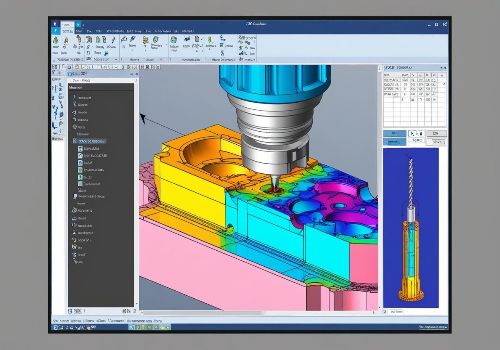
Autodesk Fusion 360 offers a full-featured free version for personal use, hobbyists, and students . This professional-grade platform combines 3D design, simulation, and toolpath generation in one integrated environment. The educational license is renewable annually and includes the same capabilities used by aerospace and medical device manufacturers.
-
ENCY Academy provides 25 free courses covering CNC programming and robotic machining, now available in 14 languages with structured “Learning Paths” for beginners . Their ENCY Essentials path is specifically designed for those starting from zero.
Simulation Software:
-
CNC Simulator Lite and similar applications allow you to write and test G-code programs on your computer, visualizing tool movements in 3D without any machine or material . This is an invaluable learning tool before you ever cut anything physical.
3. Online Courses and Structured Learning
The days of hunting through scattered YouTube tutorials are over. Structured, comprehensive courses are now available—many completely free.
-
ENCY Academy offers curated “Learning Paths” including CNC Milling Operator, which guides users through a sequence of courses toward specific competency goals . Every video includes full text transcripts that are searchable—perfect for quickly finding that one command or parameter you need.
-
Online platforms like Reed Courses offer affordable, self-paced CNC Fundamentals programs covering G-code, optimization, and troubleshooting. These are designed for home learners with no formal prerequisites.
-
Books specifically for home learners now exist, such as “CNC Machine User Guide for Beginners” (2026), which provides a structured, start-to-finish roadmap from novice to confident operator.
4. A Desktop CNC Machine (When You’re Ready)
Once you’ve learned the software basics, a desktop CNC machine puts physical cutting within reach.
The Lunyee 3018 Pro Max represents the sweet spot for home learning—affordable, capable, and genuinely beginner-friendly. With a 500W spindle, 12,000 RPM maximum speed, and a 300×180×80 mm working area, it handles wood, acrylic, plastics, and even thin aluminum. Reviewers consistently note that assembly takes only 15-20 minutes and that the machine stays remarkably stable during operation.
Smaller desktop options like the BE2216 Desktop CNC Router offer full-enclosure safety designs specifically intended for beginners and educational use . These machines fit on a desk, run on standard household power, and cost a fraction of industrial equipment.

Your Self-Directed Learning Roadmap
Phase 1: Software and Simulation (Weeks 1-4)
Start without any machine at all. This phase costs nothing.
-
Download Fusion 360 and verify your free educational or personal use license .
-
Work through the built-in tutorials. Don’t skip this—Fusion’s onboarding is excellent.
-
Take ENCY Academy’s CNC Milling Operator Learning Path, which guides you through the essential concepts in logical sequence .
-
Download a G-code simulator like CNC Simulator Lite. Write simple programs—a straight line, a circle, a pocket—and watch how the virtual tool moves .
By the end of Phase 1, you’ll understand the CAD → CAM → G-code workflow and be able to generate basic programs.
Phase 2: Desktop Machine Acquisition (Month 2)
-
Purchase a beginner-friendly desktop CNC. The 3018 Pro Max is widely recommended for its balance of capability, safety features, and community support.
-
Set up your workspace. You’ll need a sturdy table or workbench, proper lighting, and a small shop vac for dust management.
-
Run the manufacturer’s test files before creating your own. This verifies that your machine is assembled correctly.
Phase 3: First Projects (Months 2-4)
The key to learning is starting simple and gradually increasing complexity.
Project 1: Basic Engraving — Cut a simple shape or text into softwood. This teaches you work coordinate setup, toolpath generation, and basic machine operation.
Project 2: Through Cuts — Cut a shape completely out of material. This introduces tabs (to hold the part in place) and proper depth settings.
Project 3: Pocketing — Machine a recessed area. This teaches adaptive clearing and stepover strategies.
Project 4: 3D Contouring — Machine a curved surface using a ball-nose end mill. This introduces 3D toolpath strategies.
Each project should be documented. Note what worked, what failed, and why. This reflection accelerates learning dramatically.
The Role of Formal Education (Optional but Valuable)
While home learning is entirely possible, formal education remains an option for those who prefer structured, instructor-led environments.
Community colleges offer introductory CNC courses that combine online theory with lab sessions. For example, CNC 270 (Fundamentals of Computer Numerical Control) at Sacramento City College includes 25 hours of lecture and 33 hours of lab, covering setup, programming, and operation. Some components are offered online, requiring only occasional in-person lab attendance.
These programs are ideal for learners who want hands-on machine time with instructor supervision. However, for many home learners, the cost and schedule commitment may be unnecessary given the quality of free online resources.
Realistic Expectations: What Home CNC Can and Cannot Do
What’s Possible at Home
With a desktop CNC and dedication, you can:
-
Machine wood, plastics, acrylics, and soft metals (aluminum, brass)
-
Create signs, custom parts, enclosures, and prototypes
-
Learn G-code programming and CAM workflows
-
Build a portfolio of completed projects
-
Transition to small-batch production for side businesses
What Requires Industrial Equipment
Even the best desktop CNC cannot:
-
Machine hardened steels or titanium
-
Hold aerospace-grade tolerances (±0.0005″)
-
Run production quantities efficiently
-
Handle parts larger than 300×180 mm
This isn’t a limitation—it’s a realistic understanding of the tool’s purpose. Desktop CNCs are for learning, prototyping, and small-scale production. They’re not competing with $100,000 VMCs.
Cost Breakdown: What to Budget
| Item | Cost Range | Notes |
|---|---|---|
| Computer | Already owned | Any modern laptop or desktop works |
| Fusion 360 | Free | Personal/hobbyist license |
| ENCY Academy | Free | 25 courses, 120 lessons |
| CNC Simulator | Free | Mobile app or desktop version |
| Desktop CNC Machine | $300-$800 | 3018 series or similar |
| Materials (wood, acrylic) | $20-$50/month | Start with scrap and softwoods |
| Basic tools (calipers, wrenches) | $30-$100 | Incremental purchases |
| Total First-Year Investment | $400-$1,000 | Most of which is the machine |
Compare this to formal trade school programs costing $5,000-$15,000, and the value proposition of home learning becomes clear.
Safety: The Non-Negotiable Priority
Learning at home doesn’t mean ignoring safety. Desktop CNCs are powerful enough to cause injury.
Essential safety practices:
-
Always use the emergency stop—know where it is and test it
-
Wear safety glasses—always, no exceptions
-
Secure workpieces properly; a loose part becomes a projectile
-
Never leave a running machine unattended
-
Use dust collection or a shop vac; fine dust is a respiratory hazard
-
Keep hands clear of the cutting area
The 3018 Pro Max includes limit switches on all axes and a physical emergency stop button . Use them.
Common Beginner Mistakes and How to Avoid Them
Mistake 1: Rushing to Cut Without Simulation
The fix: Always simulate every new program in software before running it on the machine. Simulation catches crashes before they happen.
Mistake 2: Using Wrong Feeds and Speeds
The fix: Start with manufacturer recommendations, then adjust. When in doubt, reduce feed rate and depth of cut. You can always speed up after verifying the cut.
Mistake 3: Poor Workholding
The fix: If the part can move, the cut will fail. Use clamps, double-sided tape, or fixtures. Test hold-down security by hand before starting the spindle.
Mistake 4: Expecting Industrial Results from Desktop Equipment
The fix: Understand your machine’s capabilities. Desktop CNCs excel at wood, plastics, and light metals. They’re not designed for heavy material removal or high-volume production.
Mistake 5: Skipping the Learning Phase
The fix: Work through structured courses before designing your own complex projects. The fundamentals—work offsets, tool length compensation, G-code structure—are not optional.
The Path Forward: From Home Learner to Confident Operator
Learning CNC machining at home is not a shortcut to becoming a master machinist. It is, however, a legitimate path to acquiring fundamental skills that translate directly to professional environments.
The G-code you write at home is the same G-code that runs million-dollar aerospace machines. The CAM strategies you learn in Fusion 360 are the same strategies used in job shops worldwide. The troubleshooting mindset you develop—analyzing why a cut failed and how to fix it—is the single most valuable skill any machinist possesses.
Start with software. Learn the workflow. Buy a desktop machine when you understand what you’re doing. Practice deliberately, documenting successes and failures. Join online communities—Reddit’s r/hobbycnc, CNC forums, and Discord servers—where experienced users answer questions and share techniques.
Within six months of consistent effort, you can progress from “what’s G-code?” to confidently designing, programming, and machining functional parts at home.
The machines are affordable. The software is free. The knowledge is accessible. The only remaining ingredient is your willingness to learn.
Ready to start your CNC journey? Download Fusion 360’s free personal use license today and begin the built-in tutorials. Your first perfect part is closer than you think.